Understanding File Ownership & Source Cloud Drive
- Posted on January 2, 2026
- 4 Min Read
- Last Updated on 11 February 2026
When files from multiple cloud storage accounts appear together in FilesVerse, it is important to understand where each file comes from and who owns it.
All Cloud Hub is designed to make this clear while keeping your files fully under your control.
Files Always Belong to Their Original Cloud
All Cloud Hub does not become the owner of your files.
Every file shown in FilesVerse continues to belong to the cloud storage account where it was originally stored. If a file lives in Google Drive, it remains a Google Drive file. If it lives in OneDrive or Dropbox, it remains part of that service.
All Cloud Hub acts as a management layer that lets you view and work with files across clouds without changing ownership.
Note
Seeing files together in FilesVerse does not merge cloud accounts or storage. Each cloud storage account remains separate.
How Source Cloud Is Shown
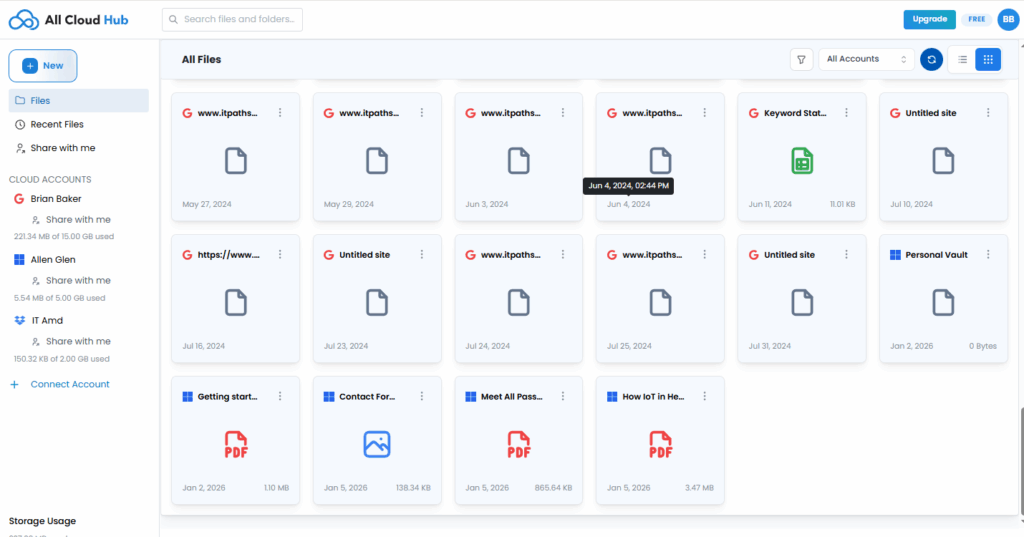
FilesVerse displays visual indicators that help you identify the source cloud for each file.
From the dashboard, files include cloud-specific icons or labels that show which cloud storage service they belong to. This makes it easy to recognize the source of a file even when files from different accounts appear side by side.
This source information remains visible whether you are browsing files or viewing search results.
What Happens When You Copy Files
When you copy a file from one cloud storage account to another using All Cloud Hub, a new copy of the file is created in the destination cloud.
The original file remains unchanged in the source cloud. Each copy is owned and managed by the cloud storage service where it resides.
This is useful when you want the same file available in more than one cloud account.
Tip
Use Copy when you want to keep the original file in its current location and also have it available elsewhere.
What Happens When You Move Files
When you move a file from one cloud storage account to another, the file is transferred fully to the destination cloud.
After the move is complete, the file no longer exists in the source cloud account. Ownership effectively shifts to the destination cloud storage service.
This action is intentional and happens only when you choose to move a file.
Warning
Moving a file removes it from the source cloud. Use this option only when you no longer need the file to remain in its original location.
Working with Files Across Accounts
Even though files appear together in FilesVerse, actions are always applied to the correct source cloud.
When you rename, organize, copy, or move a file, the action is carried out in the cloud storage account where the file lives. All Cloud Hub does not duplicate or cache files unless you explicitly perform a copy.
This ensures that file ownership and cloud boundaries remain clear and predictable.
Why This Matters
Understanding file ownership helps you avoid accidental data loss and makes it easier to manage files across multiple cloud services with confidence.
By clearly showing the source cloud and respecting ownership at all times, All Cloud Hub lets you work across clouds without uncertainty.
In Summary
Files in All Cloud Hub always belong to their original cloud storage accounts.
FilesVerse shows files together for convenience while clearly indicating their source. Copying creates a new file in another cloud, while moving transfers ownership to the destination cloud. All actions happen only when you choose them.