
As data volumes grow, individuals and small businesses increasingly need cloud storage built for backup, not just file sharing. While tools like Google Drive, OneDrive, and Dropbox are excellent for collaboration and daily access, long-term data protection requires a different mindset and different capabilities.
This guide focuses on what actually matters when choosing the best cloud storage for backup, why file-sharing tools fall short for this purpose, and how relying on a single cloud can quietly increase risk.
Backup vs File Sharing: Why the Difference Matters
File-sharing tools are designed for speed, access, and collaboration. They work well when multiple people need to edit or view the same files. However, that same convenience becomes a liability when data protection is the goal.
Common issues with file-sharing tools used as “backup” include:
- Files overwritten or deleted accidentally
- Limited or short-term version history
- No guarantee of long-term retention
- Recovery workflows that assume the original file still exists
Backup cloud storage, on the other hand, is built for failure scenarios—hardware crashes, ransomware attacks, accidental deletion, or long-term data preservation. Its purpose isn’t daily access, but reliable recovery when something goes wrong.
What to Look for in the Best Cloud Storage for Backup
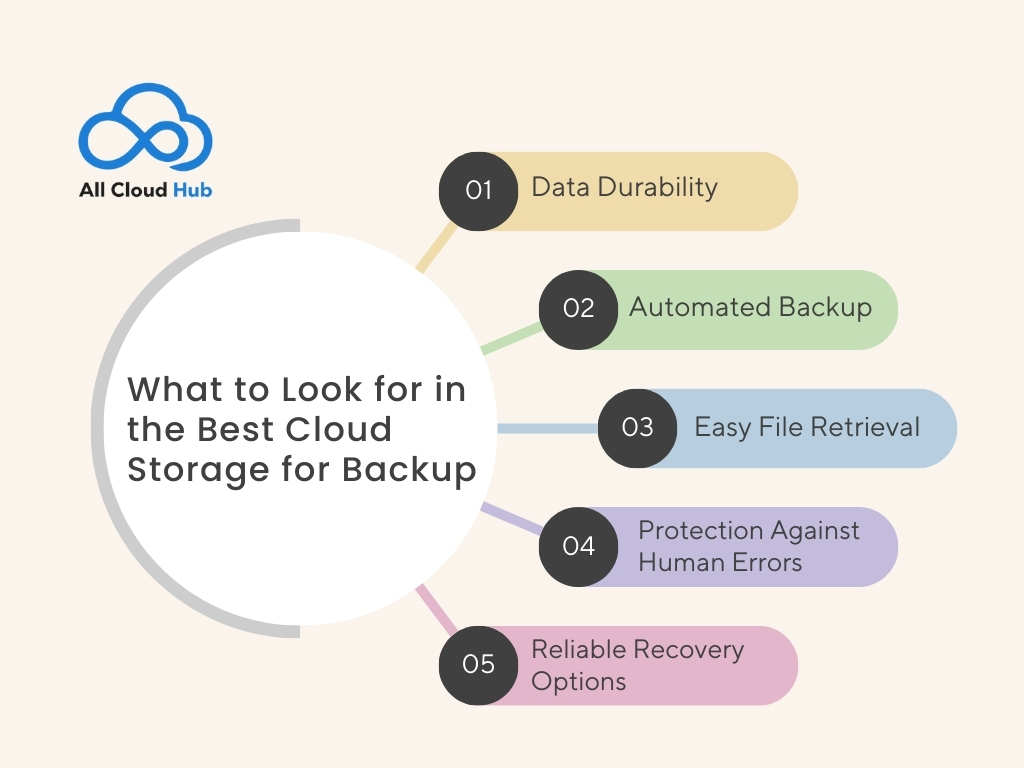
The best cloud storage is designed keeping in mind to protect data for the long term. These solutions are primarily used during data-loss events such as hardware failure, cyber incidents, or accidental deletion. When evaluating cloud backup providers, features matter less than outcomes. A good backup solution should prioritize:
- Data Durability: This helps in ensuring that files remain intact in one place over extended periods.
- Automated Backup: No more missed backups, and there will be no dependency on manual actions.
- Easy File Retrieval: Cloud backup helps to retrieve specific files or earlier versions quickly when needed.
- Protection Against Human Errors: Backup systems protect against accidentally deleting the files or overwriting them through version history and retention policies.
- Reliable Recovery Options: Cloud backup offers file restoration or supports the full recovery of the system. This maintains work continuity after hardware failures, unexpected data loss, or cybercrime.
Why Single Cloud Backups Can Be Risky for Businesses and Small Teams
File sharing isn’t backup, but a single cloud backup can also be risky.
It’s because relying on one cloud backup storage can leave the critical work data vulnerable to provider-specific failures, outages, and cyber attacks. Relying on a single backup location increases the risk of data loss if that provider experiences outages or security incidents.
This risk increases when individuals or teams need to preserve data indefinitely. However, using long term cloud storage system and backup strategies can increase resilience and reduce downtime. Businesses often implement redundant backup architectures to minimize downtime and enhance data availability.
Streamlines IT operations and supports data modernization. It meets your business needs and increases performance and efficiency. Such a full-fledged cloud backup solution offers high availability and cost savings with the best security features.
The Case for a Multi-Cloud Backup Approach
A multi-cloud backup strategy reduces risk by distributing data across more than one provider instead of concentrating everything in a single environment.
Key benefits include:
- Reduced dependency on any one cloud provider
- Greater resilience during outages or access issues
- Flexible long-term storage policies
- Stronger recovery options when data loss occurs
Many users already rely on multiple platforms—Google Drive for documents, OneDrive for work files, Dropbox for media or client sharing. The challenge isn’t switching tools, but managing backups across them in a controlled way.
For a deeper explanation of why syncing tools are not designed for true backup and recovery, IBM’s overview of data backup principles provides useful, neutral context.
Managing Backups Across Multiple Clouds Without Complexity
Adopting a multi-cloud backup approach doesn’t mean changing where files are stored. It means having visibility and control across clouds.
This is where tools like All Cloud Hub fit naturally, not as another storage provider, but as a management layer that helps users:
- Organize and monitor data across multiple cloud drives using a unified multi-cloud storage dashboard
- Move or replicate backup data between providers when needed using cloud-to-cloud transfers
Rather than replacing Google Drive, OneDrive, or Dropbox, All Cloud Hub supports a safer backup strategy by reducing blind spots and single-cloud dependency.
All Cloud Hub helps you manage and move backups across clouds without changing where your files live.
Explore multi-cloud backup management
Final Thoughts
A multi-cloud backup approach provides a stronger foundation for individuals and small businesses that need confidence their data will remain safe, accessible, and recoverable over time.
If managing backups across multiple clouds feels complex, you can explore how All Cloud Hub helps simplify multi-cloud backup visibility and control, without changing where your files already live.
FAQs
Is cloud file sharing the same as cloud backup?
No. Cloud file sharing is built for access and collaboration, not long-term data protection. Cloud backup focuses on retaining multiple versions of data and restoring files after accidental deletion, device failure, or cyber incidents.
What is the best cloud storage for backup for small businesses?
The best cloud storage for backup prioritizes data durability, automated backups, version retention, and fast recovery. Small businesses should focus on how easily data can be restored, not on collaboration or sharing features.
Why is relying on a single cloud backup risky?
A single cloud backup creates a single point of failure. Provider outages, account lockouts, or security incidents can all block access. Using a multi-cloud backup approach reduces this risk by distributing data across platforms.
Learn more about managing backups across providers with a multi-cloud storage manager.
How can I manage backups across multiple cloud providers easily?
You can manage multi-cloud backups by using a centralized tool that gives visibility across all cloud drives. Instead of replacing existing storage, this approach lets you organize and move backup data between providers using cloud-to-cloud transfers.